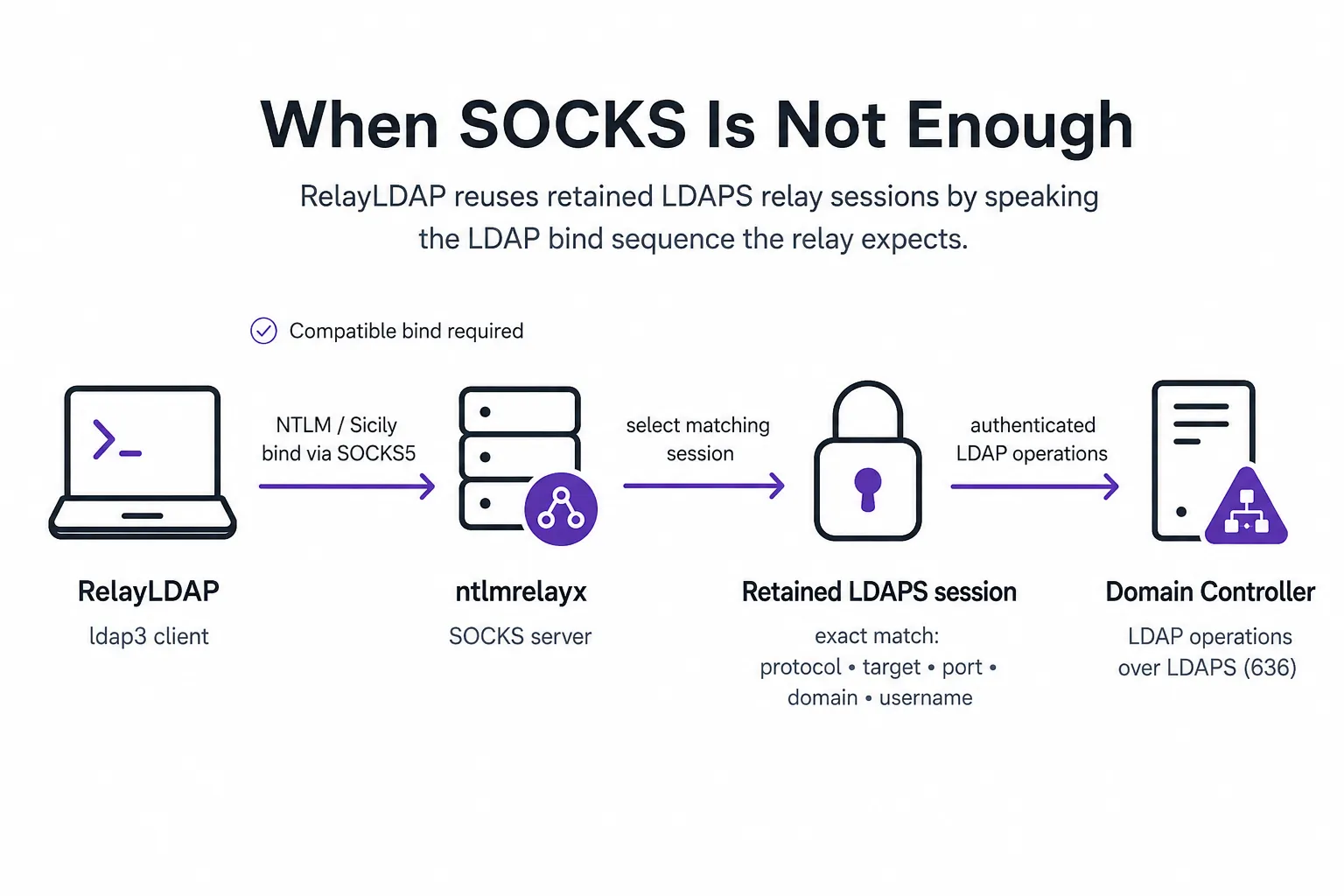
RelayLDAP started with a live problem. I had several authenticated LDAPS sessions sitting in the ntlmrelayx SOCKS console. The sessions were healthy, but the LDAP clients I normally used could not reuse them.
At first, I suspected proxying or TLS. proxychains4 reached TCP/636, but the clients would fail, close unexpectedly, or make a second connection to TCP/389, where no relay existed. The useful clue came from the relay log: the network path worked, but the LDAP bind sequence did not match what the SOCKS plugin expected.
Once I had a small ldap3 proof of concept working, I wanted to keep it around without having to remember every client quirk. I added relay selection, a practical LDAP menu, safer defaults for broad searches, and evidence logs. That became RelayLDAP.
The situation
The retained session looked like this:
ntlmrelayx> socks
Protocol  Target        Username        AdminStatus  Port  ID
--------  ------------  --------------  -----------  ----  --
LDAPS     192.0.2.10    ACME/RELAYUSER  N/A          636   23
Every field mattered:
- The retained protocol is LDAPS, not LDAP.
- The retained destination is exactly
192.0.2.10:636. - The authenticated identity is exactly
ACME/RELAYUSER. - The session is held by
ntlmrelayx; I did not have the account’s password.
The relay is not a reusable password, hash, or Kerberos ticket. It is an already-authenticated protocol session retained inside the relay process. A compatible client has to ask the SOCKS plugin for that exact session in the way the plugin expects.
Why ordinary proxying was not sufficient
At first, I treated the SOCKS listener as a generic TCP tunnel:
LDAP tool -> proxychains -> SOCKS -> domain controllerThat model is incomplete for a retained LDAP relay. The LDAP SOCKS plugin must inspect the client’s bind, identify the requested domain and username, locate a matching retained session, and then proxy the subsequent LDAP messages over it.
In the tested flow, the compatible client emitted the Active Directory NTLM mechanism commonly called Sicily:
empty bind -> Sicily/NTLM negotiate -> Sicily/NTLM responseWhen the plugin recognized that sequence, the relay log showed the expected progression:
LDAP: Got empty bind request
LDAP: Got NTLM bind request
LDAP: Proxying client session for ACME/RELAYUSER@192.0.2.10(636)
Other LDAP authentication styles can be completely valid in ordinary direct-authentication scenarios while still being incompatible with this particular retained-session workflow. They may reach TCP/636 successfully and then be rejected at the LDAP layer.
SOCKS reachability confirms the network path. It does not confirm that the client’s authentication flow is compatible with the protocol-aware relay plugin.
This is not the same as an SSH SOCKS tunnel
An SSH dynamic forward created with ssh -D is a general SOCKS proxy. The final SSH host opens each destination selected by a proxy-aware client. The ntlmrelayx SOCKS listener in this write-up serves a different purpose: it brokers access to retained, already-authenticated protocol sessions. A client must match a supported plugin, destination, identity, and application-layer exchange.
An SSH tunnel can provide the network route to a destination, but it cannot make an LDAP client compatible with a retained ntlmrelayx session. The SSH forwarding guide covers general tunnel selection; the rest of this write-up stays with the LDAP bind sequence.
What I tried
These results apply to the versions and options I tested. They are not general claims about the projects, and their behavior may change between releases.
NetExec LDAP
A representative attempt looked like this:
proxychains4 -q netexec ldap 192.0.2.10 \
  -u RELAYUSER \
  -p placeholder \
  -d ACME \
  --port 636 \
  --users
The initial LDAPS connection reached port 636. The tested NetExec build then performed an LDAP-signing or host-information preflight against port 389. Because ntlmrelayx held only an LDAPS relay for port 636, the SOCKS server correctly reported that it had no relay for the second destination.
The problem was not LDAPS support itself. This invocation opened an additional connection that did not match the retained session.
BloodyAD and its LDAP backend
The tested BloodyAD invocation also reached the relay:
proxychains4 -q bloodyad \
  -d ACME \
  -u RELAYUSER \
  -p placeholder \
  -H 192.0.2.10 \
  -s \
  get object RELAYUSER \
  --attr distinguishedName
The client then received a closed connection. Debugging from the relay side was more informative than the client exception: the SOCKS plugin reported an unknown LDAP binding request. TCP and TLS had worked; the bind shape had not matched the plugin’s supported flow.
Ldapper
Ldapper offered its own SOCKS support and an LDAPS switch:
./ldapper \
  -u 'RELAYUSER@ACME' \
  -p placeholder \
  -dc 192.0.2.10 \
  -s \
  -socks5 127.0.0.1:1080
The tested binary returned an unexpected EOF. Once again, the relay-side log showed the useful root cause: an unrecognized bind request followed by connection closure.
Impacket example scripts
The Impacket example scripts I examined did not expose a clean combination for selecting a retained LDAPS destination and producing the required bind sequence. Some defaulted to LDAP/389 or ordinary credential-based authentication.
Other versions or options may work. The scripts I examined were not a direct fit for this SOCKS use case.
ldapdomaindump
One familiar tool did work:
proxychains4 -q ldapdomaindump \
  'ldaps://192.0.2.10' \
  -u 'ACME\RELAYUSER' \
  -p placeholder \
  -at NTLM \
  -m \
  --no-html \
  -o ./ldapdump
ldapdomaindump uses ldap3, and its NTLM authentication produced the Sicily exchange accepted by the tested relay plugin. That was the clue I needed.
The small ldap3 proof of concept
The working connection used these settings:
from ldap3 import Connection, NTLM, Server, Tls
import ssl

server = Server(
    "192.0.2.10",
    port=636,
    use_ssl=True,
    tls=Tls(validate=ssl.CERT_NONE),
)

connection = Connection(
    server,
    user=r"ACME\RELAYUSER",
    password="relay-placeholder",
    authentication=NTLM,
    auto_bind=True,
    auto_referrals=False,
)
The placeholder is not an account credential. It provides nonempty input for the client-side NTLM construction; ntlmrelayx selects the existing authenticated session using the exact destination, domain, and username.
Run through proxychains4, this produced the expected empty bind and NTLM bind, after which ordinary LDAP searches worked over the retained session.
From proof of concept to RelayLDAP
The one-off script proved the mechanism. RelayLDAP added the parts needed for repeatable use: relay selection without retyping identifiers, result limits for broad searches, warnings before sensitive operations, and evidence logs.
Guided relay discovery
Impacket SOCKS mode exposes a local HTTP API containing retained sessions. RelayLDAP queries that API, filters for LDAP and LDAPS entries, and populates the protocol, destination, port, domain, and username from the selected row.
proxychains4 -q python3 relayldap.py \
  --relay-api http://127.0.0.1:9090
If ntlmrelayx was started with a custom API port, the client must use the same port:
proxychains4 -q python3 relayldap.py \
  --relay-api http://127.0.0.1:9092
The API should remain bound to loopback or another protected management interface because the tested implementation does not authenticate API requests.
Read-focused enumeration
The menu includes targeted identity and policy reads along with optional discovery for users, computers, groups, nested memberships, service-principal names, pre-authentication flags, delegation, LAPS, gMSA, and interesting text or path attributes.
The LAPS operation returns password attributes visible to the bound identity; encrypted values remain raw base64. The gMSA operation lists accounts and returns readable managed-password and membership blobs without decoding them into passwords or hashes.
RelayLDAP discovers Kerberoast and AS-REP candidates through LDAP only. It does not request Kerberos tickets or AS-REPs.
Guardrails for noisy queries
An early version allowed an operator to press Enter through the arbitrary-search prompts, producing this combination:
Filter: (objectClass=*)
Base: entire domain
Scope: subtree
Limit: 0 (unlimited)
In a real directory, that can return tens of thousands of objects. The current version defaults arbitrary searches to 100 results. Entering 0 displays the selected base, scope, and filter and requires the operator to type UNLIMITED before any LDAP request is sent.
The menu also labels and explains operations that are:
- Bulk, such as complete user, computer, or group enumeration.
- Potentially expensive, such as recursive matching-rule-in-chain searches.
- Domain-wide, such as SPN or delegation discovery.
- Credential-sensitive, such as requests for raw or readable LAPS or gMSA attributes.
These notices are not promises of stealth. They make traffic and potential detection consequences visible before execution.
Explicit write confirmation
LDAP writes can create accounts, change group membership, reset passwords, enable or disable principals, create computer accounts, or modify arbitrary attributes. Every write operation displays a summary and requires the operator to type YES.
That confirmation prevents casual keystroke mistakes. It does not make a change safe, reversible, or appropriate for every rules-of-engagement document.
Evidence logs
RelayLDAP writes separate JSONL event and result files with timestamps. The evidence directory is created with restrictive permissions, and password-change values are redacted from activity records.
The timestamps can be correlated with:
- The time authentication was relayed.
- The time a retained session was selected.
- The exact LDAP read or write category performed.
- Whether the directory operation succeeded or failed.
- The defender’s corresponding network, identity, and domain-controller telemetry.
Results may still contain sensitive directory data or credential material. Evidence protection and retention remain operator responsibilities.
Where this is useful
RelayLDAP is useful when all of the following are true:
ntlmrelayxSOCKS mode has retained an LDAP or LDAPS session.- The tester needs LDAP-native enumeration or a carefully controlled LDAP modification.
- A general-purpose client cannot match the retained protocol, destination, or bind sequence.
- The operator needs timestamps, result logs, and confirmation prompts.
It can also perform direct NTLM authentication with a real password. Use --ask-pass to keep the password out of shell history and the process list. Direct mode currently disables TLS certificate validation.
What RelayLDAP is not
RelayLDAP is not a complete Active Directory exploitation framework. It does not:
- Capture or crack NetNTLM responses.
- Coerce authentication.
- Start or manage
ntlmrelayx. - Request Kerberos TGTs, TGSs, or AS-REPs.
- Perform DCSync or directory replication.
- Execute commands through SMB, WMI, WinRM, RDP, or MSSQL.
- Turn every retained identity into an escalation path.
- Make LDAP traffic invisible to defenders.
The authority of a retained session is the authority of the relayed identity. A privileged identity may permit privileged LDAP writes; an ordinary machine or user account may provide only standard directory reads. RelayLDAP does not bypass Active Directory authorization.
Detection notes
Relevant signals include:
- Unexpected IPv6 name-resolution or WPAD behavior preceding authentication.
- NTLM authentication reaching an untrusted HTTP endpoint and then being relayed to LDAPS.
- Long-lived relay sessions maintained through periodic keepalives.
- Sudden domain-wide LDAP enumeration by an identity that does not normally perform it.
- Reads of LAPS, gMSA, delegation, or other sensitive attributes.
- Account, password, computer, group-membership, or generic attribute changes.
No single signal is conclusive. Correlate network events, authentication telemetry, LDAP activity, directory-service auditing, account-management events, and the tool’s timestamps.
Conclusion
The client-side failures looked like proxy or TLS problems, but the relay logs placed them later in the exchange: TCP/636 was reachable, and the LDAP bind was incompatible with the SOCKS plugin. Matching the retained protocol, destination, identity, and Sicily bind sequence made the session usable.
RelayLDAP does not introduce a new relay technique. It sends the bind sequence expected by the LDAP SOCKS plugin, selects the matching retained session, and adds limits, write confirmations, and evidence logs around the operations that follow.